

Goal
Explains various documents used in EWM.
Demonstration video explaining the structure and content of the EWM Documents.
Overview
ERP processes such as goods receipt, posting change/ transfer posting, and goods issue are integrated with EWM process via delivery documents. This is the major contrast with SAP WM/Stockroom management where such integration is achieved via movement types.
ERP Delivery documents are connected to EWM delivery documents that contains the settings to control the further process in EWM.
No matter if the ERP is based on the SAP Business Suite or SAP S/4HANA system, connected with a decentralized EWM, or if the EWM part is a SAP S/4HANA embedded SAP EWM, the delivery is created in SAP ERP and sent to SAP EWM

Exceptions from this document flow are:
- Advanced Production Integration: when using the advanced production integration, a production material request (PMR) is directly created in the EWM system when material staging is requested from the manufacturing order. The PMR technically is like other delivery documents in EWM, but there is no corresponding delivery document in ERP.
- Direct outbound deliveries: when you create a direct outbound delivery the process is started in EWM and the delivery is then copied to ERP.
- Kit-to-Stock: when the kit-to-stock process is started in EWM, an inbound delivery and an outbound delivery order is first created in EWM and then copied to ERP.
Classification EWM Documents
Based on the usage, EWM documents can be classified broadly in to following categories.
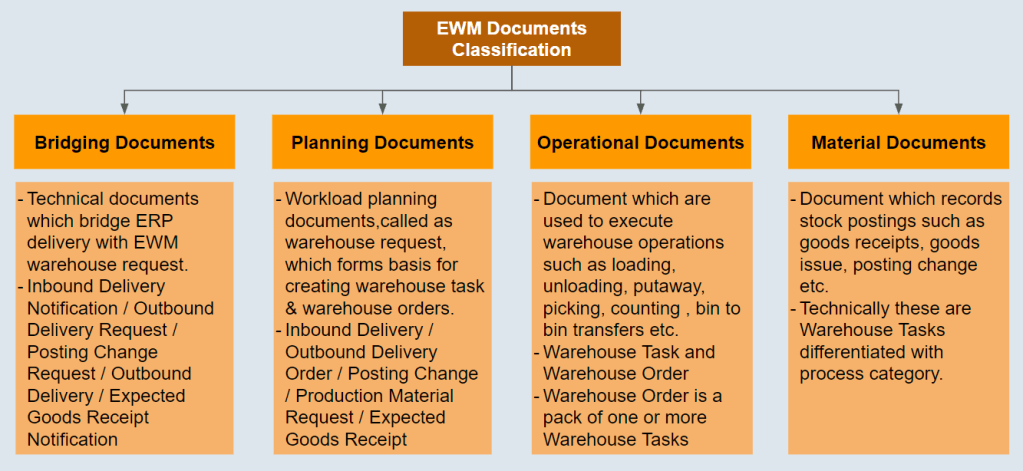
Inbound Process Documents

Inbound Delivery Notification
This is the bridging document between the ERP inbound delivery and the EWM inbound delivery and it inherits the relevant logistics data from the ERP delivery (eg advanced shipping notification, purchase order, vendor etc) which is required for the EWM inbound process.
In SAP S/4HANA embedded EWM, the inbound delivery notification does not exist. Since SAP EWM 9.5, or with the use of SAP S/4HANA decentralized EWM, the use of the inbound delivery notification is optional.
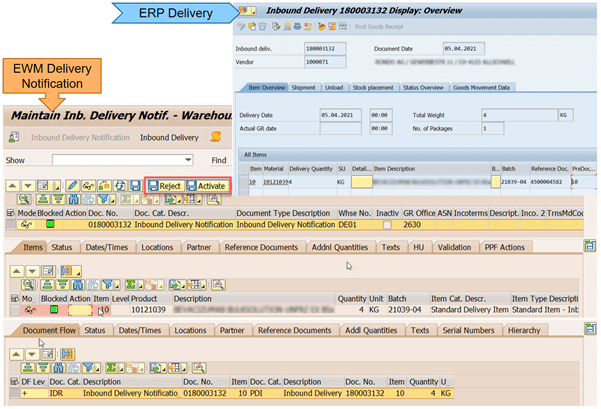
Inbound delivery
This document contains the data required for triggering and monitoring the complete inbound process that starts upon receipt of the goods in the yard and ends when the goods have arrived at the final putaway bin. The inbound delivery is created after activating an inbound delivery notification, and it inherits all the relevant data from the inbound delivery notification.

Outbound Process Documents

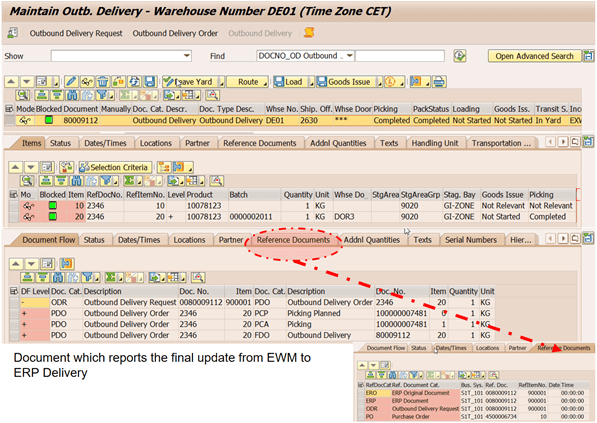
Outbound Delivery Request
This is the bridging document between the ERP outbound delivery and the EWM outbound delivery order and it inherits the relevant logistics data from the ERP delivery (sales order, ship to party, planned shipping date etc) which is required for the EWM outbound process.
In SAP S/4HANA embedded EWM, the outbound delivery request does not exist. Instead, the outbound delivery order is created directly. Since SAP EWM 9.5, or with the use of SAP S/4HANA-based decentralized EWM, the use of the outbound delivery request is optional.
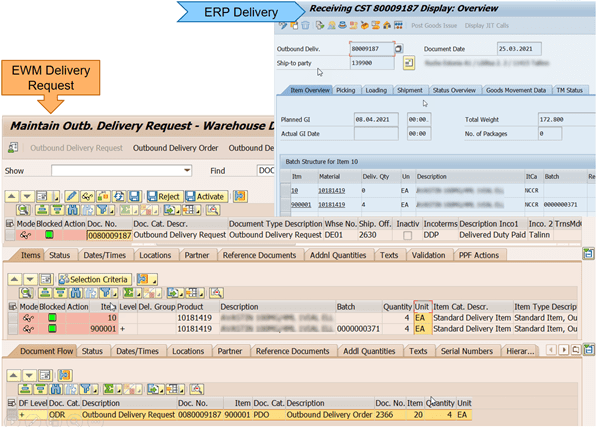
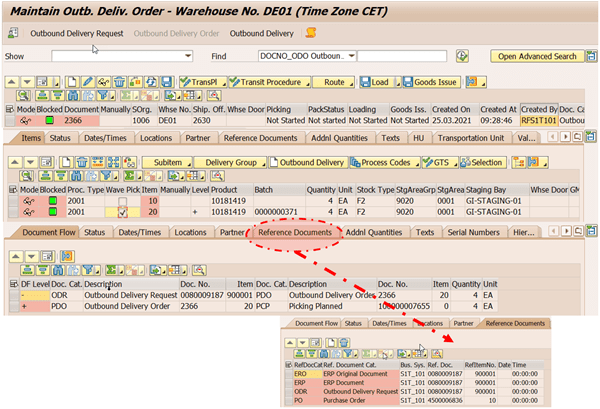
Outbound Delivery Order
This document contains the data required for triggering and monitoring the complete outbound process that starts with the initial planning activities for the outbound shipments and continues until the goods have been loaded and shipped. The outbound delivery order is created after activating an outbound delivery request, and it inherits all the relevant data from the outbound delivery request.
Outbound Delivery
This document represents the goods to be delivered together to a single goods recipient. This document is created in order to control a delivery split. It is always created, whether a split occurs or not.
Posting Change Documents
In SAP EWM, the term posting change is used to refer to a change in the material/ product, batch, stock type, or stock usage.
Posting changes can be generated in two ways in EWM.
1 – Internally in EWM
In this case, Posting Change Warehouse Task is created directly without reference to any Posting Change and this transaction is reflected as posting material document in ERP.
2 – Externally from ERP
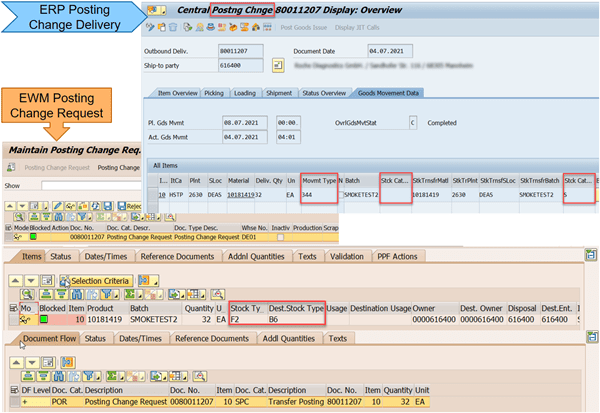
In this case, Posting Change Delivery (similar to outbound delivery) from ERP will trigger a Posting Change Request (similar to outbound delivery request) which will then crate Posting Change (similar to outbound delivery order)

Posting Change Request
This is the bridging document between the ERP posting delivery and the EWM posting change and it inherits the relevant logistics data from the ERP delivery (stock owner / party entitled dispose, stock type/usage etc) which is required for the EWM posting change process.
In SAP S/4HANA embedded EWM, the posting change request does not exist. Since SAP EWM 9.5, or with SAP S/4HANA decentralized EWM. the use of the posting change request is optional.
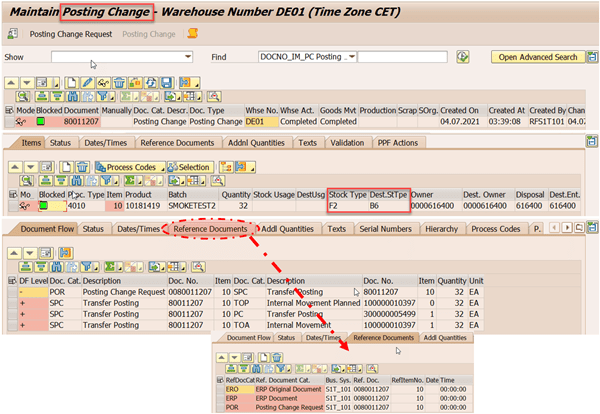
Posting change
This document contains the data required for triggering and monitoring the complete posting change process. It is from this document that the warehouse tasks are created to carry out the posting change movement. The Posting Change document is created after activating posting change request, and it inherits all the relevant data from the outbound delivery request.
Warehouse Request Documents
Like a Transfer Requirement/Delivery in SAP WM, EWM delivery document enables processing of warehouse activities such as goods receipt or goods issue posting, posting changes, putaway or picking with the help of an additional operator level document, Warehouse Task.
Warehouse Request is the generic term for a delivery document in EWM.
Warehouse Requests = Inbound delivery (PDI) / Outbound Delivery Order (PDO) / Posting Change (SPC) / Stock Transfer (WMR)
Structure of Warehouse Request

Document Header
General data and data that is relevant for inbound and outbound delivery documents, posting changes, and internal stock transfers is contained in the delivery header. This data is valid for the entire document and includes:
- Document Category and Type
- Goods receiving office or shipping office
- Scheduling data (for example, shipping or delivery date)
- Weights and volumes for the complete delivery
- Ship-from party, sold-to party, and goods recipient numbers
Document Item
In the delivery document, items contain information related to individual products within the delivery.
The following are examples of item-related information:
- Item Category and Type
- Product/material number
- Delivery quantity
- Weight and volume for item
- Location-related information such as goods receiving point or unloading point
- Dates such as goods receipt or picking date
- Tolerances for over and under delivery quantities
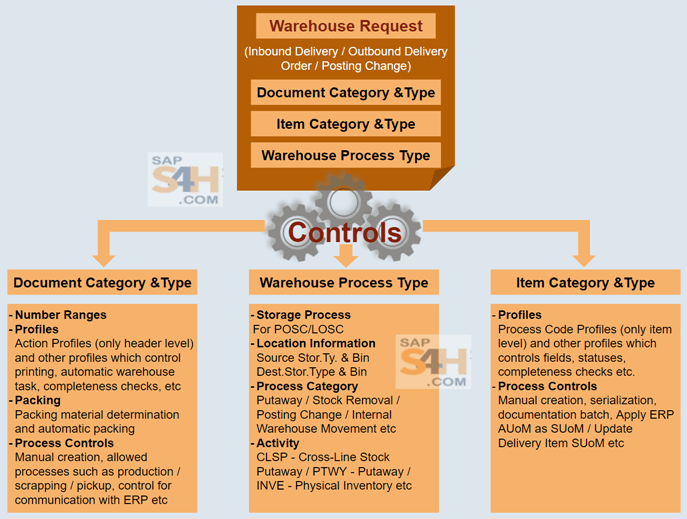
Controls Exerted by Warehouse Request
During the creation of the warehouse request a warehouse process type (WPT) is determined for the document which contains/ helps to determine the data related to the direction of the movement (putaway, picking), location information (default source or destination), and process-related settings.
In addition to the process controls exerted by the WPT, delivery document type and item type will also exert controls such as field control, serialization, when and how a warehouse task can be created, packing, and GR/GI posting
Warehouse Tasks
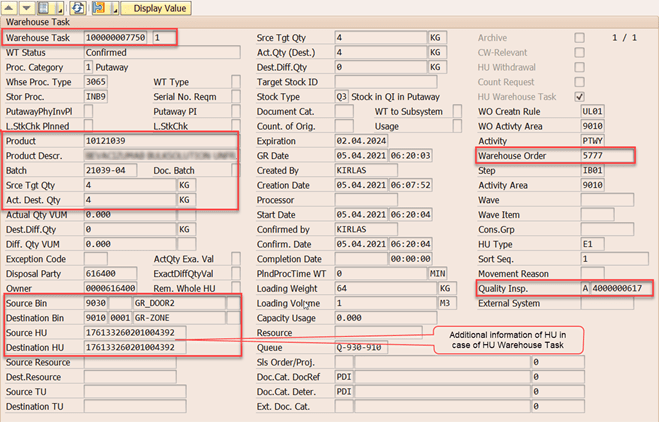
Warehouse Task is an EWM document created to execute logical or physical goods movements or stock changes such as the following:
- Putaway
Goods movement that moves a quantity of a product from a source location (eg: goods receiving area) to a destination putaway bin.
- Picking
Goods movement that moves a quantity of a product from a storage bin where the product is stored to a destination location (eg: shipping area / production staging area).
- Posting changes
A task which is used to reassign a quantity of a product to a different plant and stock type, or when its stock category changes.(eg: changing the stock type form unrestricted to blocked, changing the owner of the stock from one plant to another).
- Internal goods movements
Tasks that are generally used for “bin-to-bin” movements within the same warehouse to move products from one storage bin to another storage bin. (eg: warehouse reorganizations, and ad hoc movements of stock) . There always one picking and putaway bin for every internal movement.
- Goods receipt postings
Goods receipt posting tasks are generated in SAP EWM to represent the goods receipt inventory posting in the SAP ERP system.
- Goods issue postings
Goods issue posting tasks are generated during the goods issue process, and represent the goods issue posting in the SAP ERP system.
Creation
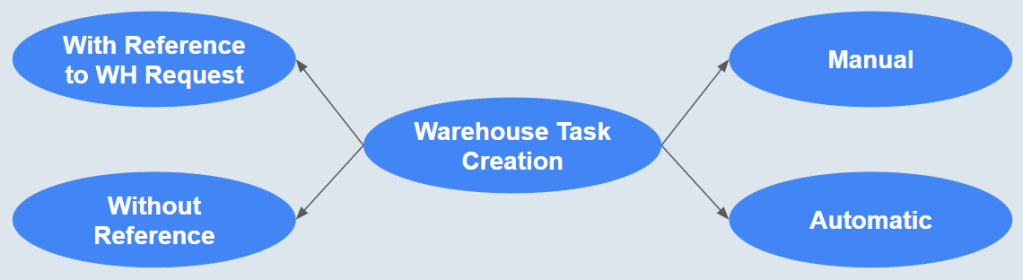
Warehouse tasks can be created manually. They are triggered automatically from a process like wave picking or generated dynamically as a result of a preceding warehouse movement. They are created either with a reference to a warehouse request document, or without a reference, for example for an internal goods movement. Warehouse tasks are controlled by the warehouse process type.
Types
There are two types of warehouse tasks:

Product Warehouse Task
Product warehouse tasks only deals with the quantity of the product without considering its handling units.
A product warehouse task reserves the quantities, so they are no longer available for other product warehouse tasks.
A product warehouse task contains the following information:
- The product to be moved
- The quantity to be moved
- The source and the destination location
HU Warehouse Task
A HU warehouse task deals not only with quantity of the product but also the handling unit in which it is packed.
Unlike the product warehouse task, the HU warehouse task does not reserve stock.
The HU warehouse task contains the following information:
- The HU to be moved
- The quantity to be moved
- The source and the destination location
Warehouse Orders
Warehouse Order is nothing but a group of warehouse tasks which are combined to form work packages for warehouse employees (resources) to perform.
The warehouse order consists of warehouse tasks or physical inventory items and pick-HUs if applicable. Once created, warehouse task are assigned to warehouse orders based on warehouse order creation rules (WOCRs). WOCRs are defined in customizing and are determined for activity areas and activities. The source or destination bins in the warehouse tasks are used to determine the activity areas used to obtain the WOCRs that are applied to the task.

 saps4h.com
Felicitaciones por este importante aporte para los consultores que queremos aprender y entender el EWM S4 HANA
Gracias por el aporte
Freddy Retto Torres
Lima – Perú
Celular 51 966975100
frettot1@hotmail.com
LikeLike