
Goal
Explains organizational hierarchy and basic functions of organizational units in Warehouse Management.
Demonstration videos for creating warehouse number, storage type, storage sections and storage bins.
Overview
Standard system is structured to represent the overall physical warehouse into 4 different levels such as warehouse, storage type, storage section & picking area and storage bin. While storage bins are maintained as business user master data with a flexibility to change as and when it is required, the remaining levels are maintained as customizing master data (SPRO).
It is optional to use Storage Unit (SU) to reflect the load bearing units such as pallets or crates which is treated as transactional data.
Quant is the lowest level unit in the warehouse which represents the content of the storage bin. Quant is a transactional data.

Warehouse Number
The warehouse number is the highest level organizational unit which is used to represent the warehouse complex.
It is defined as a customizing master data by alphanumeric three-character key that uniquely identifies a warehouse number in a client. Following control parameters are defined for each warehouse number.
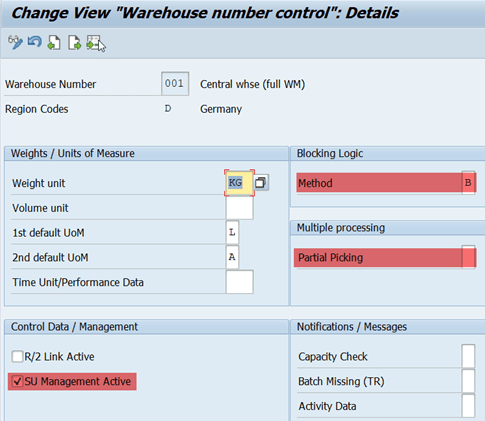
In practice, the warehouse often corresponds to a physical building or distribution center (DC) but sometimes it becomes a little tricky to represent a real warehouse in the system. It requires good business knowledge and system knowledge to map the physical warehouse in the system. Don’t worry too much at this point of time.
Examples:
Case-1: Big warehouse complex with multiple buildings connected to a single manufacturing plant.
A single warehouse number for entire complex, with each building represented by storage type, or multiple warehouse numbers can be created.
Case-2: Big warehouse complex with multiple buildings connected to multiple manufacturing plants with each plant having dedicated buildings.
In this case one warehouse number per manufacturing plant would make sense.
Case-3: Big warehouse complex with multiple buildings connected to multiple manufacturing plants but the buildings are not dedicated to any plant.
Unless detailed analysis is done form an end to business process view point it is not easy to decide to go with single or multiple warehouse numbers. For example, if multiple warehouse number are defined, it becomes practically complex in case of plant to plant transfer posting (movement type 311) because a system triggers a warehouse movement ( Transfer Order). But this can be simplified if one warehouse is defined for entire warehouse complex.
Each warehouse number has a substructure that maps the spatial arrangement in the warehouse complex in detail. Each warehouse number contains a number of subordinate organizational units (depending on the settings in Customizing): Storage types, storage sections, and picking areas
Storage Type
Organization element within the warehouse number whichis used to map a storage space that forms a separate unit within a warehouse number, spatially and/or organizationally.
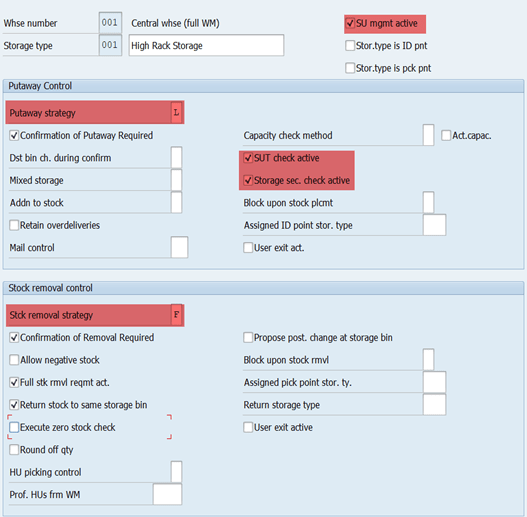
It is defined as a customizing master data by alphanumeric three-character key that is unique within the warehouse number. Following control parameters can be defined.
From a standard SAP solution perspective they can be classified into two categories based on the role played though they are same technically.
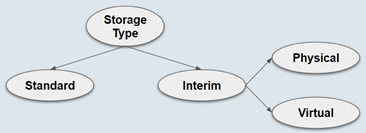
Standard: Storage types where the goods are stored and managed. Template warehouse (001) in the standard system already contains a certain set of preconfigured storage types, for example: high rack, fixed bin, and bulk storage types which can be modified per the requirement, or storage types can be created.
Interim: Storage types which plays different roles such as bridge to Inventory Management (MM-IM), staging area (GR Area (901/902), GI Area etc (916)), production supply area (100), logical/virtual storage types required by the system to certain transactions (999 in standard system to handle differences). Template warehouse (001) in the standard system already contains preconfigured storage types (which starts with 9) required for almost all business scenarios. The best practice is to use them as they are but it is possible to modify them if required.
Note: Interim storage type for production supply in standard system is 100 (does not start with 9)
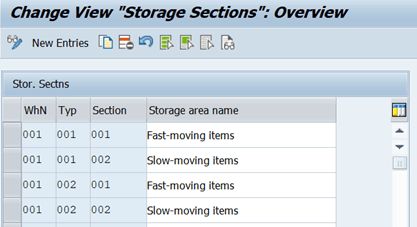
Storage Section
Organization element within the storage types that further divides the storage space.
It is defined as a customizing master data by alphanumeric three-character key that is unique within the storage type.
It does not have any control parameters assigned to it in customizing but it can be used to group several bins of storage by assigning the storage section number to the storage bin master data. The system only takes storage sections into account during putaway.
Irrespective actual business needs there must be least one storage section for each storage type.
From a business requirement perspective, storage sections can be used to group several bin where a particular kind of materials are always stored. System can automatically steer certain materials towards certain sections of storage type.
Example:
Business always want to store fast moving goods in the lowest level of the racks so that it is easy to pick the goods during the picking process. In this case all the lowest level bins of a storage type can be grouped into a separate section and steer fast moving materials to these bins automatically.
Picking Area
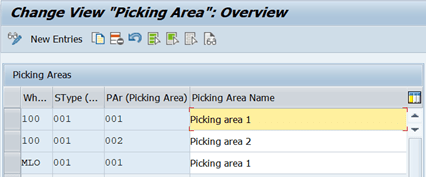
Organization element within the storage types, on the same hierarchical level as the storage section, which can be used to subdivide the area of a storage type to control the stock removal process.
It is defined as a customizing master data by alphanumeric three-character key that is unique within the storage type. It does not have any control parameters assigned to it in customizing but it can be used to group several bins of storage by assigning the picking area number to the storage bin master data.
Unlike the storage section, the picking area is an optional organizational unit. No significant functionality other than grouping bins for determining printers.
Storage Bin
Organization element within the storage section which represents the lowest physical structure possible in the warehouse (not to be confused with storage unit which is a transactional data).
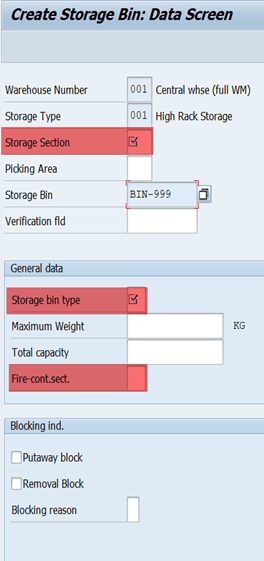
It is defined as a business user master data for a given combination of storage type and section (not as a customizing master data like storage type and section) by alphanumeric key (up to 10 characters) that is unique within the storage type.
It controls the allowed storage unit types (types of load carriers like pallets) based on the bin type assigned to it, allowed fire containment sections and allowed capacity (based on the maximum weight or capacity).Using the blocking indicators, It is also possible to block a storage bin for putaway / stock removal directly from its master record.
Quant
Quant represents the physical content of a storage bin in the system. In other words quant is nothing but a unique identification number for the quantity of material stored in a storage bin. Irrespective of material number and its unit of measure, the system always deals with the quant number for the material movements in the warehouse.
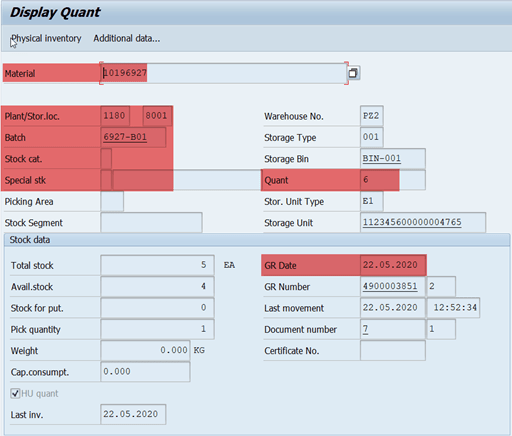
Quant is assigned with the following parameters to differentiate from each other and these parameters forms the basis for forming/splitting the quant.
- Material number
- Stock type or category
- Special stock assignment
- Plant and storage location
- The material’s batch number (if applicable)
- Storage Unit
From the moment it is created, each quant has its own data record that can be displayed directly or called from the stock overviews in Warehouse Management. This data record contains information about – quant criteria, storage information, goods receipt date and Shelf life expiration date for the quant (if required), the time of the last movement and the document number.